

Key Takeaways
-
Content strategy tools should include built-in keyword research with live data, smart topic grouping, automated calendars, writing support, and publishing with tracking to streamline the entire SEO workflow from idea to publication.
-
Always pair AI-assisted content automation with human review to ensure accuracy, originality, and brand fit—mass-producing low-value pages violates Google's policies regardless of creation method.
-
Keyword clustering groups similar keywords into single comprehensive articles rather than multiple thin posts, supporting topical authority and helping search engines recognize your expertise on subjects.
-
Prioritize keywords by relevance to your business, competitive opportunity to rank, and business value potential (leads/sales) rather than just search volume to focus efforts on high-impact topics.
-
Choose tools that integrate directly with your CMS and analytics platforms to eliminate manual copying and enable performance tracking that proves ROI rather than just content scores.
-
Small agencies need multi-client workspaces, in-house teams need automation and approvals, and e-commerce needs high-volume publishing capabilities—select based on your specific team structure and goals.
Let’s be honest. Planning content can feel like juggling flaming torches while riding a unicycle. You need keywords, topics, briefs, drafts, edits, and a publishing schedule. And you need it all to work together.
That is where a content strategy tool comes in. In SEO content automation, this kind of tool helps you decide what to publish, what to improve, and how to move each piece from idea to live page. The best ones save you hours and keep your blog on track.
But not every tool is built the same. Some give you a pretty dashboard and little else. Others handle the full workflow. In this guide, we will walk through the five features that matter most in 2026. We will also share how to pick the right fit for your team, whether you run a small agency, manage an in-house blog, or run a business of one. Grab a coffee and let’s dive in!

What Is a Content Strategy Tool for SEO?
A content strategy tool turns search data into a clear plan. It shows you which topics to write about, in what order, and why. Many tools also help with briefs, drafts, on-page checks, and performance tracking.
Think of it as a map for your blog. Without a map, you wander. With one, you know where you are going and how to get there.
In the SEO content automation world, these tools often handle repetitive steps for you. That includes keyword discovery, topic grouping, and scheduling. Automation takes care of the busywork. You bring the judgment, the brand voice, and the final say.
One note before we go further. Google allows AI-assisted content, but it warns against mass-producing low-value pages. So the smartest approach pairs automation with human review. Keep that in mind as you read on.
5 Features Every Content Strategy Tool Needs
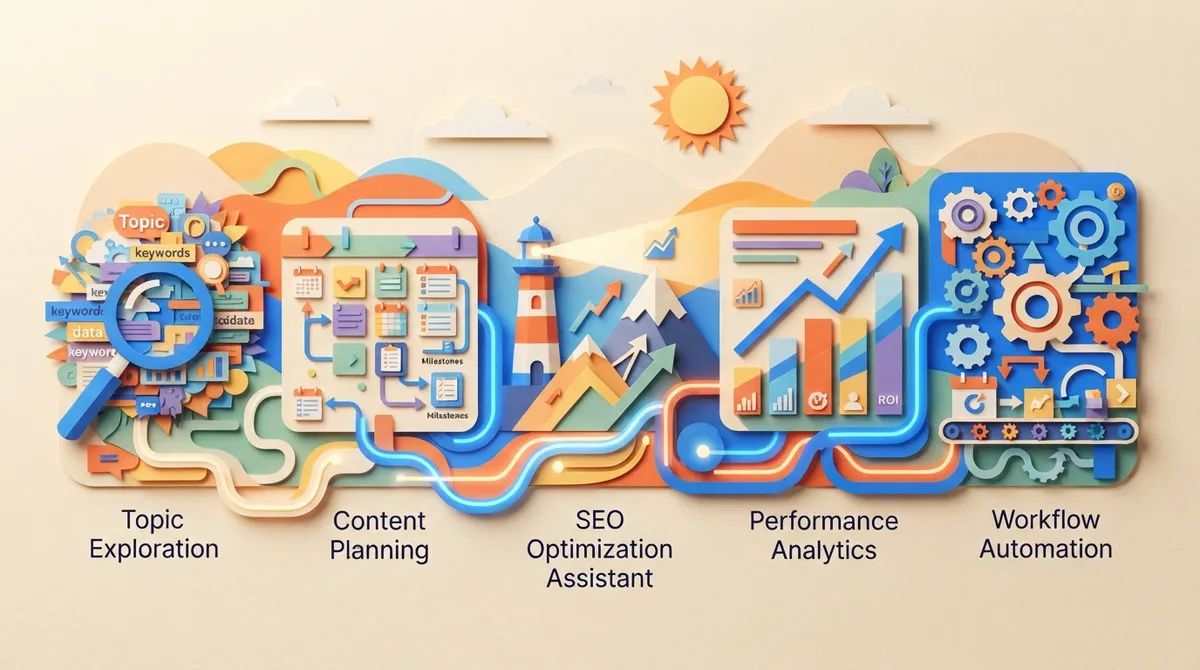
Here is the quick list. We will break each one down below.
- Built-in keyword research with live data
- Smart topic grouping and prioritization
- An automated content calendar
- Brief, draft, and on-page optimization support
- Publishing and performance tracking
1. Built-In Keyword Research With Live Data
Every good plan starts with the right keywords. If your content strategy tool does not include research, you end up jumping between apps. That slows you down and creates messy spreadsheets.
Look for a tool that shows search volume, competition, and search intent in one place. Fresh data matters here. Old numbers lead to old decisions. For context, one big vendor reports its database holds more than 28 billion keywords across 142 geographic databases. That is a vendor claim, not an industry benchmark, but it shows how deep modern research engines can go.
Search intent is just as important as volume. A keyword with big traffic is useless if the page does not match what people want. Good tools help you see whether searchers want a guide, a list, or a product page. If you want to go deeper on this, check out our post on how to master search intent optimization for better rankings.
SEO Rocket includes a full keyword research engine with live SEO data. Instead of guessing, you see real opportunities based on volume, competition, and intent. You can learn more on the features page.
2. Smart Topic Grouping and Prioritization
Once you have a long keyword list, what next? You cannot write about everything at once. This is where keyword clustering and prioritization come in.
Clustering groups similar keywords so one article can cover them all. That keeps you from writing five thin posts when one strong post would do. It also supports topical authority, which helps search engines see you as an expert on a subject.
A solid tool should also help you rank your ideas. Common ways to prioritize include:
- Relevance: Does this topic fit your business and audience?
- Opportunity: Is the competition low enough to win?
- Business value: Will this topic lead to leads or sales?
Want a deeper look at grouping? We cover it in 7 keyword clustering strategies that transform SEO in 2026. You can also explore our guide on building a topic cluster strategy.
3. An Automated Content Calendar
Here is a truth most marketers know. Consistency beats bursts. A plan is only helpful if you follow it. That is why a calendar matters so much.
Many teams still use spreadsheets to track topics. It works for a while. Then someone forgets to update it, and chaos creeps in. A built-in calendar fixes that. You add a keyword, pick a date, and the tool schedules it.
SEO Rocket does exactly this. When you add a keyword to the calendar, it schedules that keyword to become a full article. One article is generated per day, which supports steady publishing. You can plan weeks or months ahead and relax. Our post on daily blog posting strategies explains why this rhythm pays off.
Here is a quick look at what to expect from a calendar feature:
| Calendar Feature | Why It Helps |
|---|---|
| Drag-and-drop scheduling | Easy to shift plans when priorities change |
| Auto-fill from keyword list | Cuts planning time dramatically |
| Multi-week or multi-month view | Lets you plan ahead with confidence |
| Team access | Keeps everyone on the same page |
4. Brief, Draft, and On-Page Optimization Support
Strategy only works if the content is good. So the best tools connect planning to writing. Many turn research into structured briefs. These briefs suggest subtopics, headings, questions, and related terms. Then they offer draft guidance and on-page checks.
A word of caution here. These suggestions are helpful aids, not ranking guarantees. A tool that chases a perfect content score can lead you away from what readers actually need. Always ask: does this page truly help the person searching?
Human review is key. AI-generated text should be fact-checked before it goes live. Check for accuracy, originality, and brand fit. For more on this balance, read our guide to SEO content writing for beginners and our post on blog writer AI mistakes that hurt rankings.
Google’s own guidance backs this up. You can read it in the official Google Search guidance on generative AI content. The core message is simple. Use AI to help, but add real value. Mass-producing thin pages can break Google’s scaled content abuse policy, no matter how the content was made.
5. Publishing and Performance Tracking
The last piece closes the loop. A strong content strategy tool should help you publish and measure results. If you still copy and paste into your CMS, you lose time and risk errors.
Look for direct publishing to the platform you use, such as WordPress, Webflow, Shopify, or Wix. Also look for performance tracking. When a tool connects with analytics and Search Console data, you can see which pages grow and which ones stall. That tells you what to update next.
Tracking also helps you prove ROI. Compare the cost of the tool to the traffic and leads it brings in. Keep in mind that most time-saving claims you see online come from vendor case studies. They reflect specific methods and customers, so test results on your own site. Our post on Google Analytics integration for SEO content shows how to connect the dots.
How to Choose the Right Tool for Your Team
Now that you know the features, how do you pick? Different teams have different needs. Here is a simple way to think about it.
| Team Type | Top Need | What to Look For |
|---|---|---|
| Small SEO agencies | Scale without hiring | Multi-client workspaces, bulk scheduling |
| In-house marketing teams | Save time on limited resources | Automation, calendar, easy approvals |
| Content managers | Steady output across many topics | Clustering, internal linking, audits |
| E-commerce specialists | High volume of useful pages | CMS publishing, bulk planning |
| Small business owners | Low cost, low effort | Simple setup, fair pricing |
Before you buy, ask these questions:
- Where does the tool get its data, and how fresh is it?
- Does it connect to my CMS and analytics?
- Can my team collaborate and review work easily?
- Does reporting show real results, not just scores?
- Can it grow with me as I add more content or clients?
For a closer look at this process, see how to choose SEO content automation that works in 2026.
Where SEO Rocket Fits In
If you want all five features in one place, SEO Rocket is built for that. It turns SEO blogging into a system instead of a chore. You connect your site, review keyword opportunities, approve your calendar, and the platform handles the rest.
Here is what sets it apart:
- All-in-one workflow: Keyword research, planning, writing, optimization, and publishing live in one app.
- Daily publishing: One SEO-optimized article per day on the Business plan, with more for agencies.
- AI search ready: Articles are structured to be useful for Google and AI search tools alike.
- Fast setup: Under ten minutes to get going.
- Fair pricing: The Business plan starts at $99 per month, which works out to roughly $3 per long-form article.
It also supports direct publishing, a visual calendar, unlimited rewrites, and unlimited team members. You can see how it all works on the how it works page. If you want to see output quality first, check out the writing examples.
For agencies, there is a plan built for managing multiple client workspaces. That makes scaling much easier without adding headcount. And remember, automation works best with human oversight. SEO Rocket gives you the speed, and you add the final polish and brand voice.
Common Mistakes to Avoid
Even the best tool cannot fix a weak approach. Watch out for these traps:
- Publishing without review: Always fact-check and edit AI drafts.
- Chasing scores: A perfect content score does not guarantee a ranking.
- Ignoring intent: Match the page to what searchers truly want.
- Skipping updates: Old content can lose rankings. Revisit your top pages often.
- Weak internal links: Link related posts together to help readers and search engines.
On that last point, our guide on internal linking strategy mistakes is a handy read. Google also shares what it values in its Search Quality Rater Guidelines, which highlight experience, expertise, and trust.
Conclusion
A great content strategy tool does more than store ideas. It finds opportunities, groups topics, schedules posts, supports quality writing, and tracks results. Look for these five features, and you will save hours while building steady organic traffic.
Remember the balance. Automation handles the heavy lifting, and your human touch keeps content useful, accurate, and on-brand. That mix is what wins in 2026.
Ready to turn SEO blogging into a system? Start for $99/month and let SEO Rocket plan, write, and publish for you. Prefer to jump right in? You can sign up here and see how easy it is. For more tips, read our blog anytime.
FAQs
Q: What is a content strategy tool for SEO?
A: It is software that turns search data into a clear plan for what to publish and improve. Many also help with briefs, drafts, scheduling, and tracking. Think of it as a friendly map for your blog.
Q: Can AI-generated SEO content rank on Google?
A: Yes, it can, as long as it is helpful, accurate, and original. Google allows AI assistance but warns against mass-producing low-value pages. Always review and fact-check before you hit publish.
Q: What features should an SEO content strategy tool have?
A: Look for keyword research, topic grouping, a content calendar, writing and optimization support, and publishing with tracking. The more of these in one place, the less you juggle. That means more time for the fun, creative parts.
Q: How often should I update existing SEO content?
A: A good habit is to review your top pages every few months. Use Search Console and analytics data to spot pages that are slipping. Fresh facts and better answers help old posts keep their rankings.
Q: How do I measure the ROI of SEO content automation?
A: Compare the tool’s cost to the organic traffic, leads, and sales your content brings in. Track results over several months, since SEO builds over time. Be careful with vendor savings claims and test results on your own site.




