
Key Takeaways
-
Choose between technical SEO apps (metadata, speed, alt text) and content automation apps (writing, publishing) based on your store's actual bottleneck—most stores benefit from using one of each rather than trying one tool to do everything.
-
Avoid installing multiple overlapping SEO apps as they create duplicate schema, conflicting metadata edits, and broken redirects; instead pick one primary platform and only add specialized tools for specific gaps.
-
Content automation platforms that generate and publish blog articles daily at a flat monthly rate cost significantly less than traditional SEO agencies ($3,000-$5,000/month) or freelance writers ($50-$300 per article), making them ideal for scaling organic traffic.
-
Evaluate Shopify SEO apps using a 5-step process: identify your SEO gaps, check app store ratings carefully, test content quality samples, verify review controls before auto-publishing, and confirm the tool handles your catalog size.
-
AI-generated content ranks on Google when it's genuinely helpful, well-structured, and human-reviewed for accuracy before publishing; prioritize apps with preview options, brand voice settings, and rollback capabilities over full automation.
-
The best SEO app depends on your store size and needs, not star ratings—a boutique with 20 products needs different tools than a catalog with 5,000 SKUs, and most ranking gains come from consistent quality content paired with clean technical basics.
Running a Shopify store is exciting, but let’s be honest: keeping up with SEO can feel like a part-time job you never signed up for. You want your products to show up on Google. You want fresh blog content. And you want it all without spending your weekends buried in spreadsheets. Good news: you’re in the right place, and we’re going to walk through this together like friends chatting over coffee.
Picking the best SEO app for Shopify isn’t about grabbing whatever has the most stars in the app store. It’s about matching a tool to your store’s actual needs. Do you need help with product descriptions? Blog content? Technical fixes like broken links and image alt text? The answer shapes everything. This guide breaks it all down so you can make a smart, confident choice.

Why “Best” Depends on Your Store, Not a Star Rating
Here’s a truth that a lot of Shopify guides skip: there is no single best SEO app for every store. A small boutique with 20 products has very different needs than a catalog with 5,000 SKUs. Some apps focus on technical SEO. Others focus on content creation. Very few do both well.
Before you download anything, get clear on what’s actually slowing your store down. Is it slow-loading images? Thin product descriptions? A blog that hasn’t been updated in months? Once you know the gap, choosing an app becomes so much easier.
Common Shopify SEO Needs to Consider
- Automated meta titles and meta descriptions across hundreds of products
- Image compression and automatic alt-text generation
- JSON-LD structured data for rich results
- Broken link detection and redirect management
- Sitemap support and Google Search Console monitoring
- SEO scoring that tells you what to fix first
- AI-generated product descriptions, collection copy, and blog articles
Notice that last point. Most Shopify SEO apps stop at technical fixes. Very few can actually write and publish content for you. That distinction matters a lot if your real goal is consistent organic traffic, not just a cleaner backend.
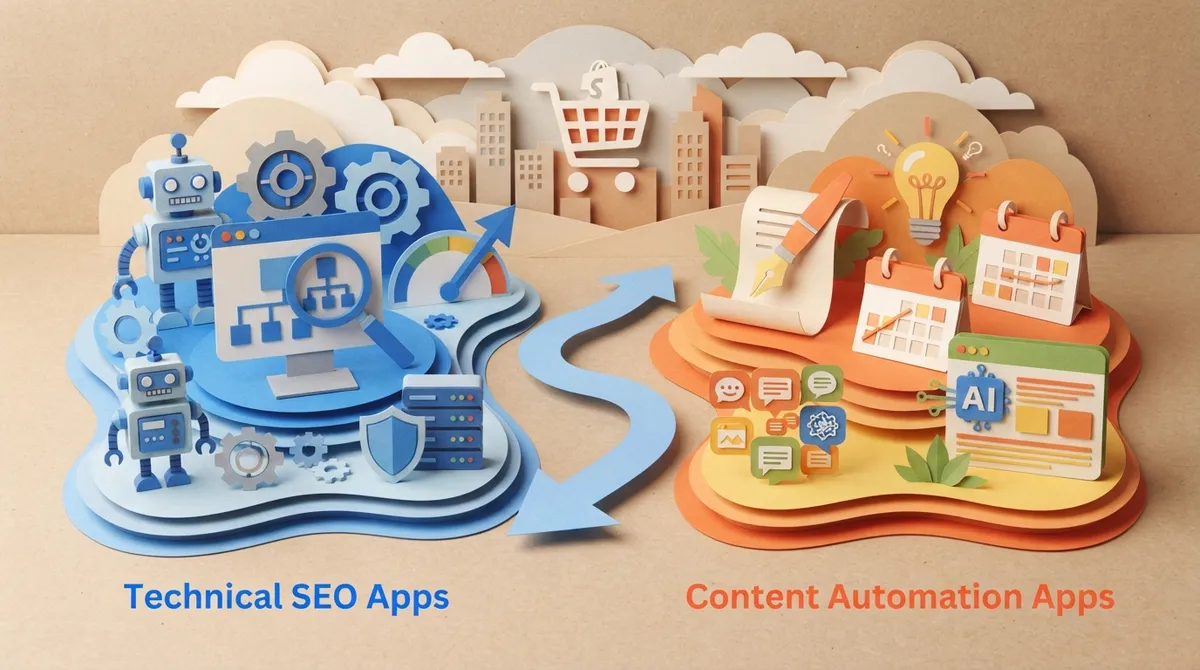
Technical SEO Apps vs Content Automation Apps
This is the part that trips up a lot of merchants. There are two very different categories hiding under the same “Shopify SEO app” label, and knowing the difference will save you money and frustration.
Technical SEO Apps
These tools focus on the plumbing of your store. They fix things Google cares about behind the scenes, like page speed, structured data, and metadata. According to a 2026 comparison from Blackbelt Commerce, these apps commonly automate image compression, meta-title generation, JSON-LD schema, alt text, and broken-link fixes. They’re great for cleanup, but they usually don’t write new content for you.
Content Automation Apps
These tools go a step further. They generate product descriptions, collection pages, and full blog articles on a schedule. This is where SEO Content Automation platforms shine, because they treat content creation like a system instead of a one-time task. If your Shopify store needs a steady stream of blog posts to build topical authority, this is the category you actually want.
How to Evaluate a Shopify SEO App in 5 Steps
- List your biggest SEO gaps. Write down what’s missing: metadata, images, content, or all three.
- Check the Shopify App Store listing carefully. Look at current ratings, review counts, and whether automation features are included in the free plan or locked behind a paid tier.
- Test the content quality. If the app writes copy, read a sample. Does it sound like your brand or like a robot wrote it?
- Look for review and approval controls. You want the ability to check AI-generated changes before they go live on your store.
- Confirm it fits your catalog size. Bulk editing matters a lot more when you have thousands of products versus a handful.
Following this process helps you avoid a common mistake: installing an app because it’s popular, then realizing three months later it doesn’t solve your actual problem.
Popular Shopify SEO Apps and What They’re Known For
Let’s look at some of the names that come up again and again in 2026 comparisons. Keep in mind that pricing and ratings change often, so always double-check the live Shopify App Store listing before you commit.
| App Type | Commonly Reported Strength | Best For |
|---|---|---|
| Booster SEO | Automated meta tags, alt text, broken-link fixes, image optimization | Hands-off technical automation |
| TinyIMG / Tiny SEO | Image compression, structured data, page speed | Stores prioritizing speed and media |
| Yoast SEO for Shopify | On-page guidance, editorial recommendations | Merchants who want writing tips, not full automation |
| SearchPie | General SEO scoring and audits | Merchants wanting an overview dashboard |
| Avada SEO Suite | Broad technical SEO toolkit | Stores wanting an all-in-one technical app |
A 2026 comparison from Oxify reported Booster at 4.8 stars from over 5,000 reviews, SearchPie near 4.9 stars, and TinyIMG close to a perfect 5.0 rating. These numbers shift over time, so treat them as a starting point, not gospel.
Why Blog Content Automation Deserves Its Own Category
Here’s something worth sitting with for a second. Shopify’s own App Store SEO category now includes AI blog-writing products that generate and publish posts on a schedule. That’s a big deal. It means content publishing automation has become its own distinct need, separate from metadata and image fixes.
If your store sells products in a competitive niche, technical fixes alone won’t get you ranking. You need fresh, helpful content that answers real questions your customers are searching for. That’s exactly the gap SEO Rocket was built to fill. Instead of juggling a metadata app, a separate writing tool, and a content calendar spreadsheet, everything lives in one place.
What Full Content Automation Looks Like
- Built-in keyword research using live search data, not guesswork
- A visual content calendar that schedules articles automatically
- One long-form article generated and published per day on the Business plan
- Automatic internal linking, metadata, and image generation
- Real-time SEO scoring with fix suggestions before anything goes live
You can explore exactly how this process works on the How it works page, or browse real writing examples to see the quality for yourself.
Avoiding the Multi-App Trap
It’s tempting to install five SEO apps at once, thinking more tools equal more results. Please don’t do this. Overlapping apps often create duplicate schema, competing metadata edits, and conflicting redirects. That’s a headache Google does not reward.
Signs You’re Running Too Many SEO Apps
- Your meta descriptions keep reverting to old versions
- You see duplicate structured data errors in Search Console
- Page speed dropped after adding a new app
- You’re not sure which app is responsible for a change
The simple fix: pick one primary SEO automation platform and only add a specialized tool if there’s a clear, specific gap it fills. This keeps your store’s SEO clean and easy to manage, especially if you’re a small business owner wearing five hats already.
What to Check Before Letting an App Auto-Publish Changes
AI automation is wonderful, but it still needs a human checking its work. Here’s a quick checklist before you flip the switch on full automation.
- Does the app let you preview changes before they go live?
- Can you set brand voice and tone guidelines?
- Is there a rollback option if something looks off?
- Does it validate product data before generating descriptions?
- Can you review content for factual accuracy first?
This matters even more if you’re a content manager overseeing hundreds of product pages, or an agency managing multiple client stores. One wrong auto-generated claim about a product can create real problems. Google’s own Search Quality Rater Guidelines emphasize trustworthiness and accuracy, which is a great reminder that automation should support human judgment, not replace it entirely.
Cost Considerations for Small Businesses and Agencies
Pricing varies a lot across Shopify SEO apps. Some offer free tiers with limited features. Others start around $39 per month for automated technical fixes. If you’re comparing that against hiring a traditional SEO agency, which often runs $3,000 to $5,000 a month, the math starts looking very different.
For teams that need content at scale, like small SEO agencies managing multiple clients, cost per article matters a lot. A platform that produces long-form, optimized articles daily for a flat monthly rate can end up costing just a few dollars per article. You can see current plans on the pricing page to compare against what you’re paying now for freelancers or in-house writing time.
Quick Cost Comparison Snapshot
- Traditional SEO agency: $3,000–$5,000+ per month
- Freelance writer per article: $50–$300, inconsistent scheduling
- Basic technical SEO app: Often $10–$40/month, no content writing
- Full content automation platform: Flat monthly fee, daily publishing included
This is especially relevant for digital marketing consultants who need to show clients real ROI without inflating their own overhead.
A Simple Decision Framework
Feeling a little overwhelmed by options? Totally normal. Here’s a short framework to simplify your decision.
- If you only need technical fixes (speed, schema, alt text), choose a dedicated technical SEO app.
- If you need editorial guidance while you write yourself, choose an on-page SEO assistant.
- If you need consistent blog content and product copy without doing the writing, choose a content automation platform.
- If you manage multiple client stores, prioritize a platform built for scale and team collaboration.
For most growing stores, the biggest ranking gains come from consistent, quality content paired with clean technical basics. That’s why pairing a lightweight technical app with a dedicated content automation system tends to outperform trying to do everything with one narrow tool. You can read more strategy breakdowns like Content Automation SEO: How to Scale Organic Traffic in 2026 for a deeper dive.
Real-World Example: E-commerce SEO at Scale
Imagine an e-commerce SEO specialist managing a store with 3,000 products across a dozen collections. Manually writing unique descriptions for every item would take months. Add a blog that needs weekly posts, and the workload triples.
This is exactly where automation earns its keep. Bulk metadata updates handle the technical side. A scheduled content calendar handles the blog side. According to Charle Agency’s 2026 comparison, merchants should always verify current pricing and ratings directly in the Shopify App Store before committing, since these numbers shift frequently.
If you’re curious how a full editorial calendar approach works in practice, check out this guide on internal linking strategy mistakes to avoid in 2026, since internal links are a huge part of helping Google understand your product pages.
Bringing It All Together
Choosing the best SEO app for Shopify really comes down to honesty about your needs. A technical app cleans up the backend. A content automation platform fills your blog and product pages with fresh, optimized writing. Many successful stores end up using one of each, carefully chosen to avoid overlap.
If you’re spending too many hours each week trying to keep up with SEO tasks manually, it might be time to explore a system built for automation. And if you ever want a second opinion on your broader digital strategy, teams like Wayne & Sons Landscaping & Junk Removal show how even local service businesses benefit from consistent, well-optimized content that builds trust over time.
For updates on new features rolling out across the industry, it’s worth keeping an eye on recent changelog updates and the product roadmap from platforms you’re considering, so you know what’s coming next.
Your Next Step
You don’t have to figure this out alone, and you definitely don’t need to spend your evenings wrestling with plugins that only solve half the problem. If your Shopify store needs consistent, high-quality content without the manual grind, you can start for $99/month and let automation handle the daily writing and publishing while you focus on running your business. Or if you’re ready to see it in action right away, go ahead and sign up today. You’ve got this, and we’re cheering you on every step of the way.
FAQs
Q: What is the best SEO app for Shopify if I want to automate blog content?
A: If your goal is consistent blog publishing, you want a content automation platform rather than a basic technical SEO app. Look for one with built-in keyword research, a content calendar, and daily publishing so you’re not stuck writing everything yourself.
Q: Can AI-generated Shopify content actually rank on Google?
A: Yes, AI-generated content can rank well when it’s genuinely helpful, well-structured, and reviewed for accuracy before publishing. The key is treating automation as a head start, not a replacement for quality checks and brand voice.
Q: Should I use multiple Shopify SEO apps at once?
A: It’s usually better to stick with one primary SEO app and add a specialized tool only when there’s a clear gap. Running several overlapping apps can cause duplicate schema, conflicting metadata, and messy redirects.
Q: What’s the difference between a technical SEO app and a content automation app?
A: A technical SEO app focuses on backend fixes like image compression, alt text, and structured data. A content automation app actually writes and publishes product descriptions, collection pages, and blog articles for you.
Q: How much should I expect to pay for a Shopify SEO app?
A: Pricing varies widely, from free tiers to $39 or more per month for technical apps. Full content automation platforms often charge a flat monthly rate that works out to just a few dollars per article, which is far cheaper than hiring an agency.