

Key Takeaways
-
Manual content publishing costs 20+ minutes per article; platform integration eliminates copy-pasting by automatically sending finished articles with titles, images, meta descriptions, and tags directly to your CMS.
-
61% of enterprises already connect SEO tools directly to their CMS systems, while 40% build custom API connections—manual publishing is becoming the exception as consistency becomes critical for competing with AI-powered search.
-
Native connectors are the fastest integration option for most teams, requiring only a few clicks with no coding; APIs and webhooks offer flexibility for custom setups, while SDKs work for unusual tech stacks.
-
A fully integrated workflow moves keyword research, AI drafting, optimization, human review, and publishing automatically while capturing analytics data—this eliminates formatting errors and ensures every article includes proper metadata, alt text, and internal links.
-
Start with draft-first publishing to maintain quality control, implement strict permission settings to prevent accidental deletions, and monitor API connections regularly since third-party platforms update their systems periodically.
-
SEO automation tools market reached $803 million in 2024 with projections of $1.5 billion by 2028; over 56% of marketers now use generative AI in their SEO workflow, making automation no longer optional but expected.
Picture this: you finally write a great blog post, and then you spend 20 minutes copying it into WordPress, fixing the formatting, adding tags, uploading images, and setting a meta description by hand. Now multiply that by every article, every month, forever. That’s the daily grind that platform integration is meant to fix. If you’ve ever wished your content tools could just talk to each other, you’re in the right place.
In this guide, we’ll break down what platform integration actually means for SEO content automation, why it matters more than ever in 2026, and how to set it up without a computer science degree. Whether you’re running a small agency, managing a busy in-house team, or just trying to keep your website’s blog alive, this is written for you.

What Is Platform Integration in SEO Content Automation?
Platform integration is simply the connection between your content tools. It links your keyword research, your writing tool, your website, and your analytics dashboard so they can share information automatically. Instead of moving data by hand, everything flows between systems on its own.
Think of it like plumbing. You don’t want to carry buckets of water from room to room. You want pipes that move water where it needs to go, quietly, in the background. Platform integration is those pipes for your content.
In practice, this means your SEO content platform can send a finished article, its title, images, meta description, and tags, straight to your CMS. No copy-paste. No missed steps. It just shows up, ready to publish.
Why This Matters More Than Ever
Search engines and AI tools like ChatGPT, Perplexity, and Gemini are hungry for fresh, well-structured content. Teams that publish consistently tend to win. But consistency is hard when every article needs manual handling.
Industry estimates suggest a large share of enterprise SEO teams already lean on integrations to keep up. One secondary industry report suggests around 61% of enterprises connect their SEO automation tools directly to their CMS systems, while roughly 40% build custom connections using APIs. These numbers should be treated as directional, not exact, but they point to a clear trend: manual publishing is becoming the exception, not the rule.
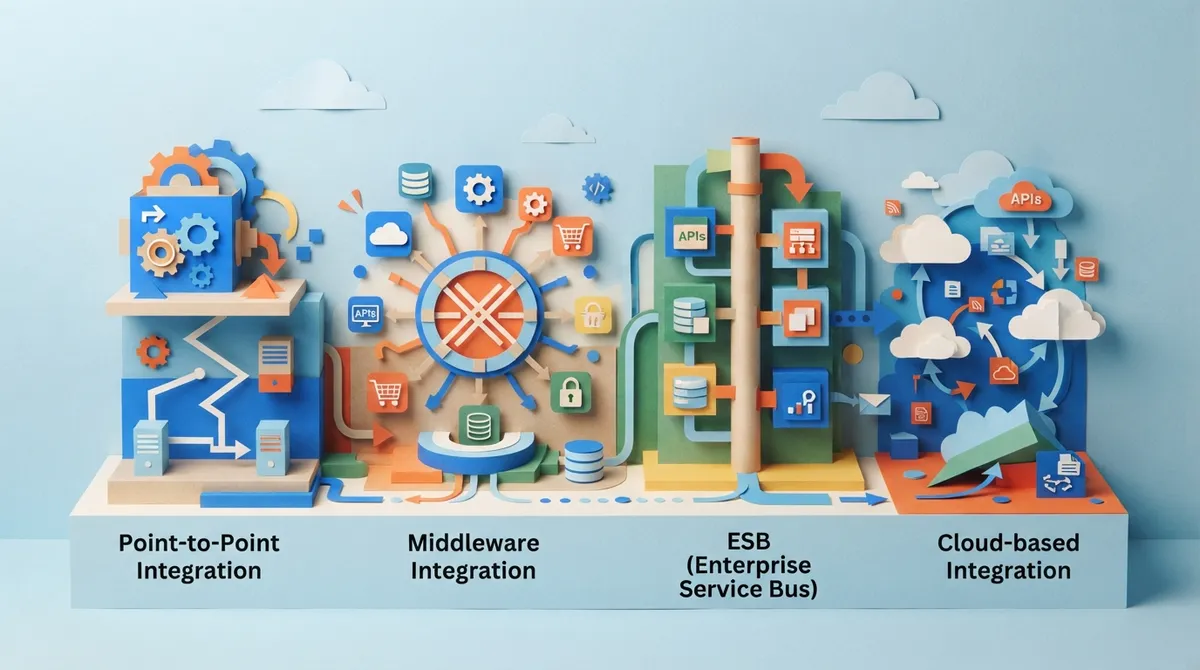
The Main Types of Platform Integration
Not all integrations work the same way. Understanding the differences helps you pick the right setup for your team’s needs.
- Native connectors: These are pre-built links between your SEO content tool and popular platforms like WordPress, Shopify, or Webflow. They’re usually the fastest to set up, often taking just a few clicks.
- APIs (Application Programming Interfaces): These give developers more control. They’re great for custom websites or unusual tech stacks that don’t have a native connector.
- Webhooks: These send a signal the moment something happens, like \”article published\” or \”draft ready for review.\” They trigger other tools to act automatically.
- SDKs (Software Development Kits): These are toolkits developers use to build custom integrations when nothing off-the-shelf fits.
For most small business owners and marketing teams, native connectors are the easiest starting point. They require little to no coding and get you moving fast. If you want to see what a well-designed connection setup looks like, check out the features built into modern content automation platforms.
Which CMS Platforms Should You Connect?
The CMS is usually the most important connection point. This is where your content actually lives and gets seen by readers.
Here’s a quick look at common CMS platforms and how integration typically works with each one.
| CMS Platform | Common Integration Method | Best For |
|---|---|---|
| WordPress | Native plugin or API | Blogs, small business sites, agencies |
| Shopify | Native app or API | E-commerce product and category pages |
| Webflow | API or native connector | Design-focused marketing sites |
| Wix | Native integration | Small business websites |
| HubSpot | Native connector or API | Marketing teams using CRM tools |
| Ghost | API or webhook | Publishers and newsletter-driven blogs |
| Squarespace | API or manual export | Small business and portfolio sites |
If you run an e-commerce store, connecting your SEO content tool to Shopify means product descriptions and category pages can get fresh, optimized copy without you touching a single line of code. If you manage a blog on WordPress, that connection can mean daily articles showing up in your dashboard, already formatted and ready to go live.
How a Fully Connected Content Workflow Actually Works
Let’s walk through what a smooth, connected workflow looks like from start to finish.
- Keyword research: The system finds real keyword opportunities based on search volume and competition.
- Content planning: Keywords get added to a calendar, so you always know what’s coming next.
- AI drafting: The article gets written automatically, following SEO best practices.
- Optimization: Titles, meta descriptions, headers, and internal links get checked and improved.
- Human review: A team member can glance over the draft before it goes live.
- Publishing: The finished article gets sent straight to your CMS.
- Measurement: Analytics tools track impressions, clicks, and rankings so you know what’s working.
This is exactly the kind of system SEO Rocket was built around. It handles keyword research, writing, optimization, and daily publishing without you lifting a finger. Setup takes under 10 minutes, and once it’s connected to your WordPress, Webflow, Shopify, or Wix site, it just keeps publishing fresh content every single day.
What Data Actually Moves Between Systems
A good integration doesn’t just send raw text. It sends everything an article needs to look polished and perform well.
- Article title, slug, and body content
- Categories and tags
- Author information
- Featured images and alt text
- Meta titles and meta descriptions
- Canonical URLs and internal links
- Schema markup for search engines
- Publication status (draft or live)
When all of this moves automatically, your content shows up looking professional every time. No missing alt text. No forgotten meta description. It’s all there.
Connecting Analytics and CRM Tools
Publishing content is only half the job. You also need to know if it’s working. That’s where analytics and CRM integrations come in.
Connecting your content platform to tools like Google Search Console lets you see impressions, clicks, and rankings without switching tabs all day. Pair that with your CRM, and you can track how blog traffic turns into actual leads and sales.
A 2025 report from Neuron Expert found that more than 56% of marketers now use generative AI somewhere in their SEO workflow, whether that’s extensive use or just occasional help. That number keeps climbing as more teams realize AI and automation aren’t optional anymore, they’re expected.
Common Mistakes to Avoid
Platform integration sounds simple, but a few missteps can cause real headaches. Here’s what to watch for.
- Publishing without review: Always use a draft-first setting when you’re just getting started, so a human can check things before they go live.
- Weak permission settings: Give team members only the access they need. Not everyone should be able to publish or delete content.
- Ignoring duplicate content: Make sure your system checks for duplicate posts before publishing.
- Unprotected API keys: Treat your API credentials like passwords. Never share them in public places.
- No monitoring: Third-party platforms change their APIs sometimes. Keep an eye out for failed connections so nothing silently breaks.
Good governance isn’t optional, it’s what makes automation trustworthy. A connected system without oversight can create just as many problems as a manual one.
Choosing the Right Integration Setup for Your Team
Not every business needs the same setup. Here’s how different teams typically approach this.
Small SEO agencies usually want fast, native integrations across multiple client websites. Speed and simplicity matter more than deep customization. In-house marketing teams often need integration with existing CRM and analytics tools they already rely on. Content managers at larger sites want bulk publishing and consistent formatting across hundreds of pages. Digital marketing consultants benefit from tools that make them look efficient and modern to clients. E-commerce SEO specialists need integrations built for product and category pages at scale. And small business owners usually just want something that works without a technical learning curve.
Whatever category you fall into, the goal is the same: less manual work, more consistent output, and content that actually performs. If you want to see real examples of what fully optimized, automatically published articles look like, browse the writing examples from an active content calendar.
Why SEO Rocket Makes Platform Integration Simple
SEO Rocket was designed from the ground up to remove the friction from platform integration. You connect your website once, whether it’s WordPress, Webflow, Shopify, or Wix, and the system takes care of the rest.
Here’s what that looks like in practice:
- Connect your website in a few clicks.
- Review keyword opportunities the system discovers automatically.
- Approve your content calendar for the weeks or months ahead.
- Let the platform generate and publish a 3,000-word article daily on the Business plan, or up to 10 per day on the Agency plan.
Every article includes AI-optimized metadata, internal and external links, images, and real-time SEO scoring with auto-fix suggestions. There’s no manual formatting, no copy-pasting, and no waiting around for a writer to finish a draft. You can explore the full pricing options to see which plan fits your publishing goals.
Traditional SEO agencies often charge $3,000 to $5,000 a month for similar output. SEO Rocket runs at a fraction of that cost, roughly $3 per long-form article, while still producing content built for both Google and AI search engines like ChatGPT and Perplexity. If you’re curious how real users describe their experience, the reviews section shares honest feedback from agencies and business owners alike.
For teams that want a deeper technical breakdown of connecting content tools to a CMS, our guide on how to use CMS integration to automate your SEO content covers the setup process step by step. And if you’re still building your foundational content strategy, our piece on content automation SEO for scaling organic traffic in 2026 is a great next read.
Measuring Whether Your Integration Is Actually Working
Once everything is connected, don’t just assume it’s working. Check in regularly.
- Are articles publishing on schedule without errors?
- Is metadata (titles, descriptions, alt text) showing up correctly?
- Are your analytics tools picking up traffic from new pages?
- Are keyword rankings improving over time?
According to a 2025 secondary market estimate, the global SEO automation tools market was worth roughly $803 million in 2024, with projections reaching $1.5 billion by 2028. Whatever the exact number turns out to be, the direction is clear. More teams are investing in automation because it works, and because manual publishing simply can’t keep pace with modern content demands. You can also review the official Search Quality Rater Guidelines to understand what search engines expect from published content, which helps confirm your integration is producing pages that meet real quality standards.
Getting Started Without the Overwhelm
If this all sounds like a lot, take a breath. You don’t need to build a perfect system on day one. Start small.
- Pick one CMS to connect first, usually the one your main website runs on.
- Turn on draft-first publishing so you can review before anything goes live.
- Watch a few articles move through the system to build confidence.
- Add analytics tracking once publishing feels stable.
- Expand to more platforms or client sites once you’re comfortable.
Every big, smooth-running content system started with one small connection. Give yourself permission to learn as you go, and don’t be afraid to ask for help along the way. You can always check the FAQs for quick answers to common setup questions, or reach out through the support team if something feels stuck.
Wrapping Things Up
Platform integration isn’t just a technical nice-to-have anymore. It’s the difference between spending your week copy-pasting content and spending it growing your business. When your keyword research, writing, optimization, and publishing tools all talk to each other, content stops being a chore and starts being a system.
Whether you’re a small agency juggling multiple clients, an in-house marketer stretched thin, or a small business owner who just wants consistent traffic, connecting your tools the right way pays off fast. If you’d like to see how this works without any of the manual setup headaches, you can sign up and start your free trial today, or explore plans starting at $99 a month to see which fits your goals. For more tips on scaling your content strategy, feel free to read our blog anytime.
FAQs
Q: What does platform integration mean in SEO content automation?
A: It simply means connecting your SEO content tool to the places you publish and measure content, like your CMS, analytics dashboard, and CRM. Instead of copying and pasting everything by hand, your tools share information automatically. It’s like giving your content workflow its own set of pipes so everything flows smoothly.
Q: Which CMS platforms can integrate with an SEO content automation tool?
A: Most modern tools connect with WordPress, Shopify, Webflow, Wix, HubSpot, Ghost, and Squarespace. Some platforms also support custom websites through APIs. If your site runs on one of these, you’re in good shape for a smooth setup.
Q: Can SEO automation tools publish content directly to a CMS?
A: Yes, many tools can send finished articles, images, and metadata straight to your website without you touching a thing. This saves hours every week and keeps your publishing schedule consistent. You can even set it up to save drafts first if you want a quick review before anything goes live.
Q: What is the difference between native integrations, webhooks, and APIs?
A: Native integrations are pre-built connections that are easy to set up, usually in just a few clicks. APIs give developers more flexibility for custom setups, while webhooks send instant signals when something happens, like a new article being ready. Most small businesses start with native integrations because they’re the simplest option.
Q: How do you measure the ROI of integrating SEO content automation with analytics?
A: Start by tracking traffic, rankings, and leads before and after you connect your tools. Compare the time you save each week against the cost of your automation platform. Many teams find that consistent publishing, paired with real analytics data, quickly pays for itself through steady organic growth.




